This template uses custom fonts.
See the demo and find the detailed guide to connecting fonts at the bottom of the page.
See the demo and find the detailed guide to connecting fonts at the bottom of the page.
THE
SHADOW
WHO ARE YOU?
WHAT ARE YOU HIDING?
"DO NOT BE AFRAID OF THE SHADOWS, THEY MEAN THAT THERE IS A LIGHT BURNING NEARBY"
The
SHADOW IS
"In analytical psychology, the shadow (also known as id, shadow aspect, or shadow archetype) is either an unconscious aspect of the personality that the conscious ego does not identify in itself, or the entirety of the unconscious; that is, everything of which a person is not fully conscious."
THE SHADOW SIDES ARE PART OF US. Hiding shadows means not accepting your personality completely, it means giving up part of your powers. To show the shadow side in my project, I decided to use exaggeration images of clowns mimes and "Commedia Dell' Arte" characters.
Of course, this whole story directly related to my life. I always hid behind the mask of good girl and was afraid to show myself from other sides, wich, it seemed to me, are unacceptable to sociaty. I did it out of fear of being rejected, of being unloved. I know for sure that this story is familiar to most of pepole. My main goal is to open as many souls as possible, to direct people to look towards their true selves. Also it will help me accept myself.
Of course, this whole story directly related to my life. I always hid behind the mask of good girl and was afraid to show myself from other sides, wich, it seemed to me, are unacceptable to sociaty. I did it out of fear of being rejected, of being unloved. I know for sure that this story is familiar to most of pepole. My main goal is to open as many souls as possible, to direct people to look towards their true selves. Also it will help me accept myself.
INSPIRATION
"The clown is not at all afraid of this world - he creates and recreates it...
HE SELF-FRIENDLY PLAYS WITH REALITY"
HE SELF-FRIENDLY PLAYS WITH REALITY"
The Clown
The mask always gives the image of mystery. In the Italian theater of masks, this attribute is directly related to the verb "to hide". Each character covers their shadow side with a mask. Someone is very cowardly, but pretends that he can move mountains. Someone is so hurt that he has to pretend to be a fool.
Masks meaning
TECHNICAL
DETAILS
DETAILS
The most inspiring parts from the whole research are rhombus details and exaggeration of everything: emotions, size, colours and so on...
So I connected these two pieces in one sample: EXAGGERATED RHOMBUS
So I connected these two pieces in one sample: EXAGGERATED RHOMBUS
Rhombus and exaggeration
There is you can see starting points of technical details.
MOODBOARD
Also I researched lots of different pics/artistic costumes with cubes and tried to create weaving repeating inspirational lines.
PROCESS OF WEAVING
PROCESS OF WEAVING
Development
Greta Chamyan
OUR
TEAM
Evelina A
Narmina
Guseynova
Guseynova
SEAMSTRESSES & CONSTRUCTORS
TEXTURE
Greta Chamyan
Evgeniya Yastrebova
Zarina Budaeva
Eva Chakryan
Artem Arch
Angelina Keshishyan
Susanna Keshishyan
Olga Malisheva
Tamara Kalaichyan-
Ayvazyan
Ayvazyan
Irina Dolova
HEAD DESIGNER
DESIGNER
DESIGNER
LAWYER
ARCHITECTOR
ARCHITECT &
EVENT ORGANIZER
EVENT ORGANIZER
BUSINESS WOMAN
&DESIGNER &
SEAMSTRESS
&DESIGNER &
SEAMSTRESS
SEAMSTRESS & CONSTRUCTOR
SEAMSTRESS
CONSTRUCTOR
HEAD DESIGNER
FINANCE & MANAGEMENT
DENTIST
DETAILS
& PROCESS
& PROCESS
For prints I used different emotions (lines) and characters from "Commedia Dell' Arte".
Prints
Design Development Moodboards
Step
by step
by step
COLOUR PALLET
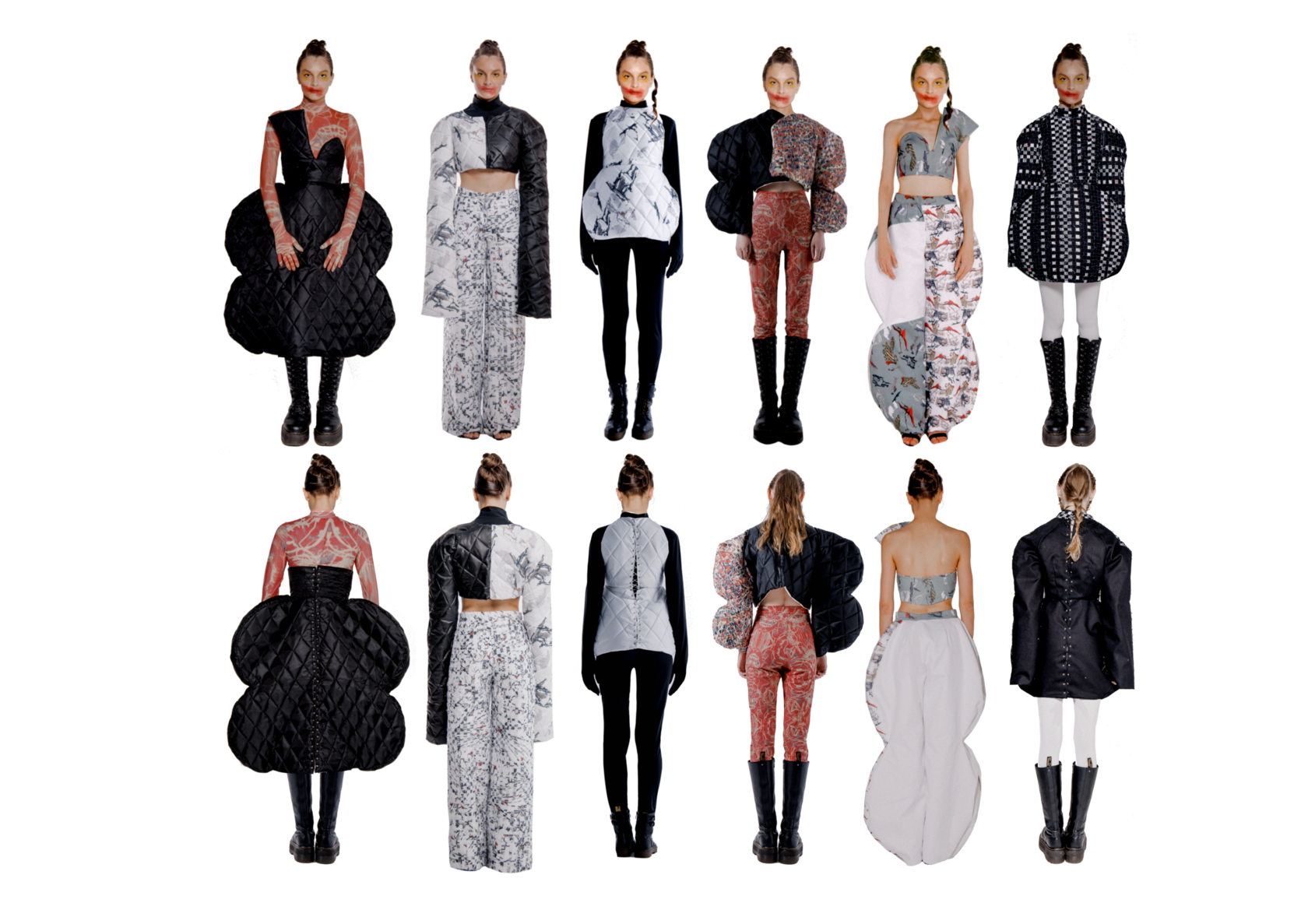
GALLERY
Maxim Butnaru
CREDITS
Iaroslava Frolova
Violetta Osipyan
PRODUCTION
PHOTOGRAPHER
ASSISTENT
Anastasia Masnova
Valeria Smirnova
Anna T
MODEL
MODEL
MODEL
Alexandra Migovic
MAKE-UP ARTIST
showreel
GALLERY
LOOKING AT SOME IMAGES, YOU CAN FEEL FEAR AND DISGUST
But pay attention to the fact that even through fear and disgust you are able to see the beauty. Be brave and look deep into yourself, where it is scary. There is hidden a true beauty in it.
Attention!
This template requires custom fonts. Set them up manually before using this template.
Heading font: TheNightWatch
Body text font: Roboto
How to set up font:
1. Download TheNightWatch Font: https://fontesk.com/the-night-watch-font.
a. Open the downloaded folder the_night_watch. You'll need "TheNightWatch.ttf"
b. Convert TTF/OTF file to WOFF (you can use this tool CloudConvert (https://cloudconvert.com/woff-converter))
2. Go to Site Settings → Fonts and Colors → Custom Settings → Your Own Font → Upload Font Files
a. Upload "TheNightWatch.woff" to BOLD
b. Under "Font Name," enter custom name for the font, e.g., "TheNightWatch".
c. Set TheNightWatch as default Heading font
d. Save changes
3. Go to Site Settings → Fonts and Colors → Basic Fonts
a. Choose Roboto as Body Text Family Name
b. Save changes
4. In the page editor, update fonts for each block. See the template demo as a reference: https://thenightwatch-template.tilda.ws/
5. Save changes. Done!
This template requires custom fonts. Set them up manually before using this template.
Heading font: TheNightWatch
Body text font: Roboto
How to set up font:
1. Download TheNightWatch Font: https://fontesk.com/the-night-watch-font.
a. Open the downloaded folder the_night_watch. You'll need "TheNightWatch.ttf"
b. Convert TTF/OTF file to WOFF (you can use this tool CloudConvert (https://cloudconvert.com/woff-converter))
2. Go to Site Settings → Fonts and Colors → Custom Settings → Your Own Font → Upload Font Files
a. Upload "TheNightWatch.woff" to BOLD
b. Under "Font Name," enter custom name for the font, e.g., "TheNightWatch".
c. Set TheNightWatch as default Heading font
d. Save changes
3. Go to Site Settings → Fonts and Colors → Basic Fonts
a. Choose Roboto as Body Text Family Name
b. Save changes
4. In the page editor, update fonts for each block. See the template demo as a reference: https://thenightwatch-template.tilda.ws/
5. Save changes. Done!
